I built my own to-do and expense tracker on Cloudflare (and the server can’t read my data)
For years my whole life ran through two commercial apps: a to-do list and an expense tracker. Work tickets, rebalancing my ETF portfolio, podcast episodes I wanted to come back to, and every single thing I spent money on, all of it stored on some company’s infrastructure.
Then the subscriptions got more expensive and the interfaces changed for no good reason. Apps that had worked perfectly and cost little turned into an everyday hassle: redesigns that made no sense, features that disappeared or stopped working. At some point it was just too much.
So I built my own. As far as I’m concerned, SaaS is dead. Well, kind of. Both apps look and feel like the ones I used to use, both run entirely on Cloudflare, both work offline, and every task title, amount, category and note is encrypted on my device before it leaves it. The server stores my data, but it can’t read it.
This post is mostly about how that works: the encryption model I borrowed from Bitwarden, the local-first architecture it forces on you, and what it was like to build both apps together with an AI coding agent.
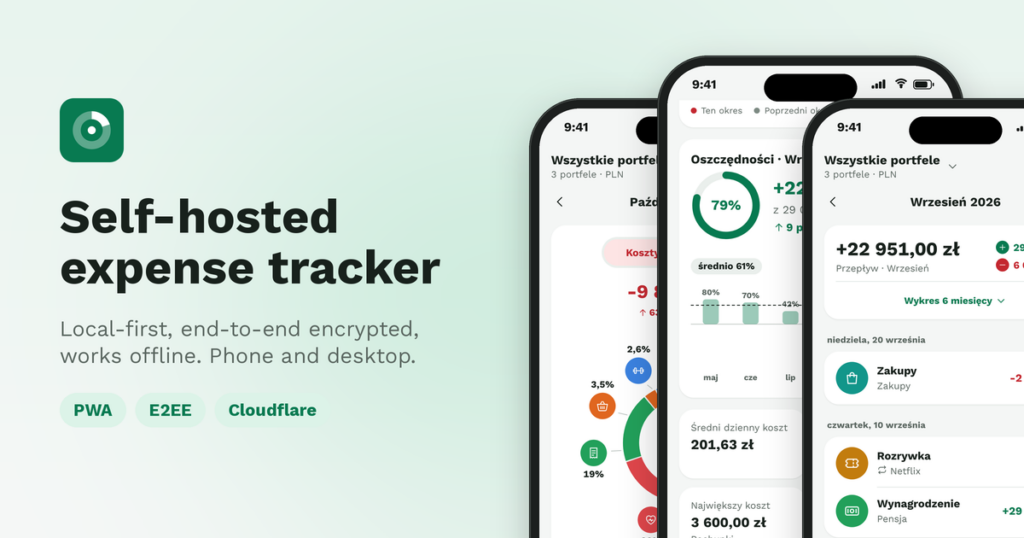
The two apps in a nutshell
Both are PWAs: installed from the browser on my Android phone, no app store, with their own icon and push notifications. The interface is in Polish, because I built them for my own daily use.
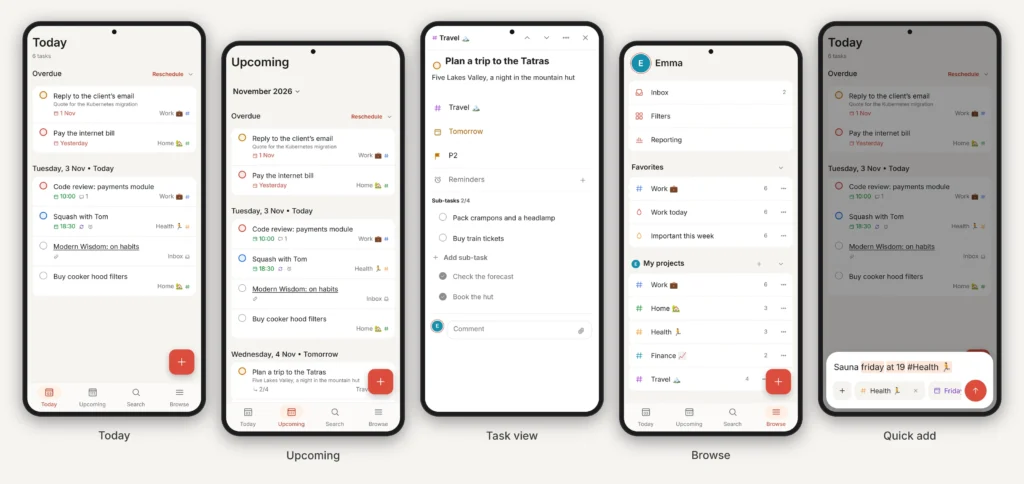
The to-do app has everything I actually used before: Today and Upcoming, projects with sections, sub-tasks, recurring tasks, filters, reminders with „Complete” and „Snooze” in the notification, and quick add that understands Sauna friday at 19 #Health.
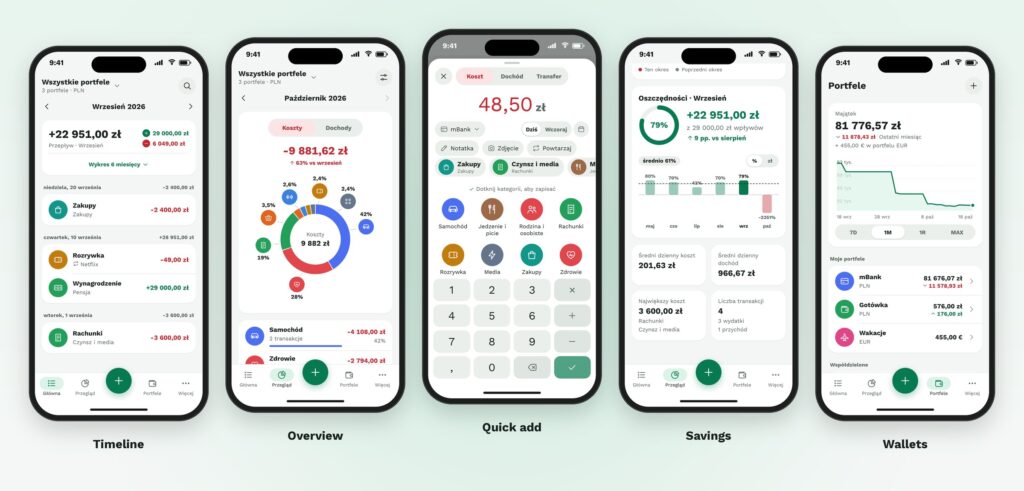
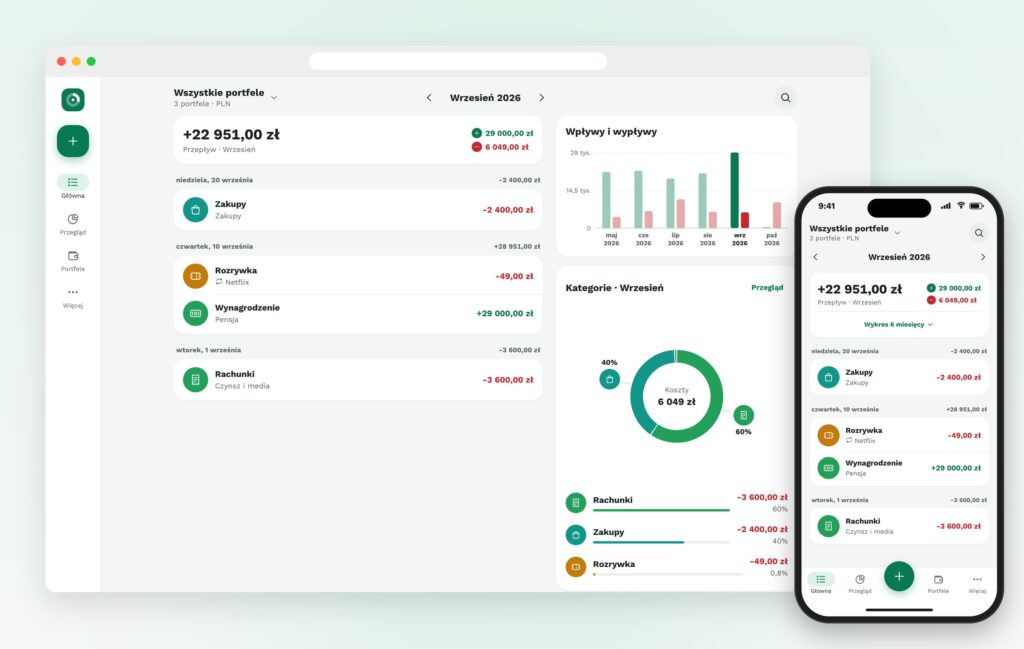
The expense tracker does wallets in several currencies, recurring transactions, receipt photos, a savings rate and the usual charts. Adding an expense is „+”, the amount and a category. I imported my full history from the old app’s CSV export, and the totals match to the „grosz”.
Borrowing the Bitwarden model
I’ve used Bitwarden as my password manager for years, and its security model is exactly what I wanted for tasks and money. Bitwarden’s servers store your whole vault, but only as ciphertext. Everything is encrypted with a key that only your master password can unlock, and the master password never leaves your device. If Bitwarden got hacked tomorrow, the attacker would get a pile of encrypted blobs.
Both of my apps copy that design almost one to one:
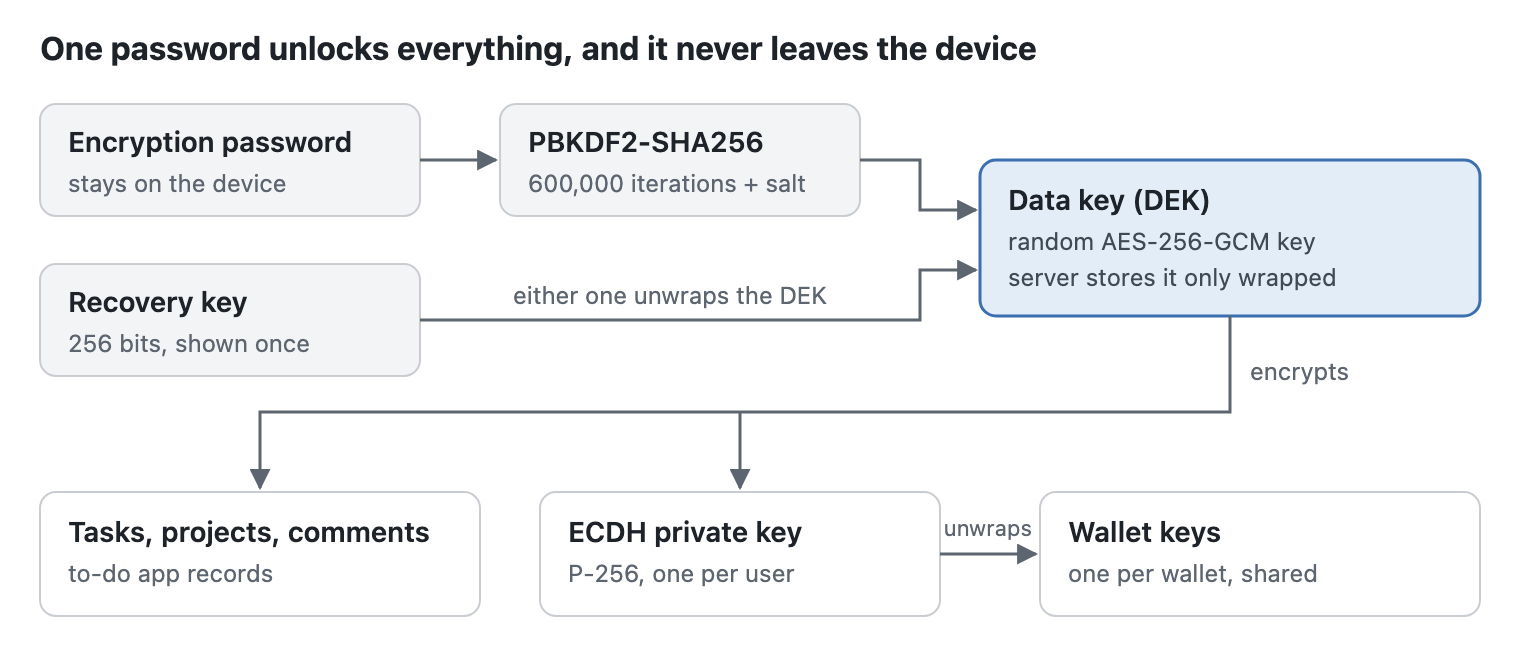
- A random data key, wrapped by the password. At setup the browser generates a random AES-256 data key (DEK). An encryption password goes through PBKDF2-SHA256 with 600,000 iterations, the same default Bitwarden uses, and the resulting key wraps the DEK. The server only ever stores the wrapped version.
- A recovery key, shown once at setup, wraps the same DEK a second time. That’s one thing Bitwarden doesn’t give you: forget its master password and the vault is gone. Here I get a second way in, but lose both the password and the recovery key and the data is gone too, by design.
- Sharing through public keys. Bitwarden shares an organisation’s key by encrypting it with each member’s public key. The expense tracker does the same for shared wallets: each wallet has its own key, wrapped for every member with ECDH P-256 and HKDF. On invite, both phones show a verification code derived from the public key, so I can check that the server didn’t slip in its own key. Bitwarden calls this the fingerprint phrase.
- PIN and fingerprint unlock, like Bitwarden’s vault timeout. In the expense tracker even the local copy in IndexedDB is encrypted with a device key, and decrypted data lives only in memory after unlocking. Five wrong PINs and only the encryption password will open it.
Where I went further than Bitwarden
Bitwarden has to do two jobs with one password: prove who you are to the server and decrypt your vault. So it derives a hash from the master password and sends that to log in. My apps don’t need that. Identity comes from Cloudflare Access, which sits in front of the whole app, so the encryption password is never sent anywhere, not even as a hash. Logging in and decrypting are two completely separate things.
Two more rules hold everywhere:
- Web Crypto only. AES-GCM, PBKDF2, ECDH and HKDF all come from the browser’s built-in Web Crypto API. No crypto libraries from npm, no home-made primitives. Keys on the device are non-exportable
CryptoKeyobjects, so the app can use them, but no script can read the raw bytes out. - Every ciphertext is bound to its record. Each encrypted blob carries its record’s identity (scope, type, ID and key version) as authenticated data. A malicious server, or anyone with database access, can’t move the encrypted amount of one transaction into another. There are tests proving that a moved ciphertext fails to decrypt.
What’s left for the server to see is the bare minimum it needs to sync and to check who may read what:
| The server sees | The server never sees |
|---|---|
| Record IDs and how they relate (task → project, transaction → wallet) | Task titles, descriptions and comments |
| Wallet members and their roles | Project and filter names, filter queries |
| Timestamps for sync and deletions | Amounts, transaction dates, categories and notes |
| Attachment sizes | Wallet names and balances |
| When a notification is due | Attachments and receipt photos |
| To-do app only: due dates, priority, status and list order | Recurring rules and notification text |
How it is built
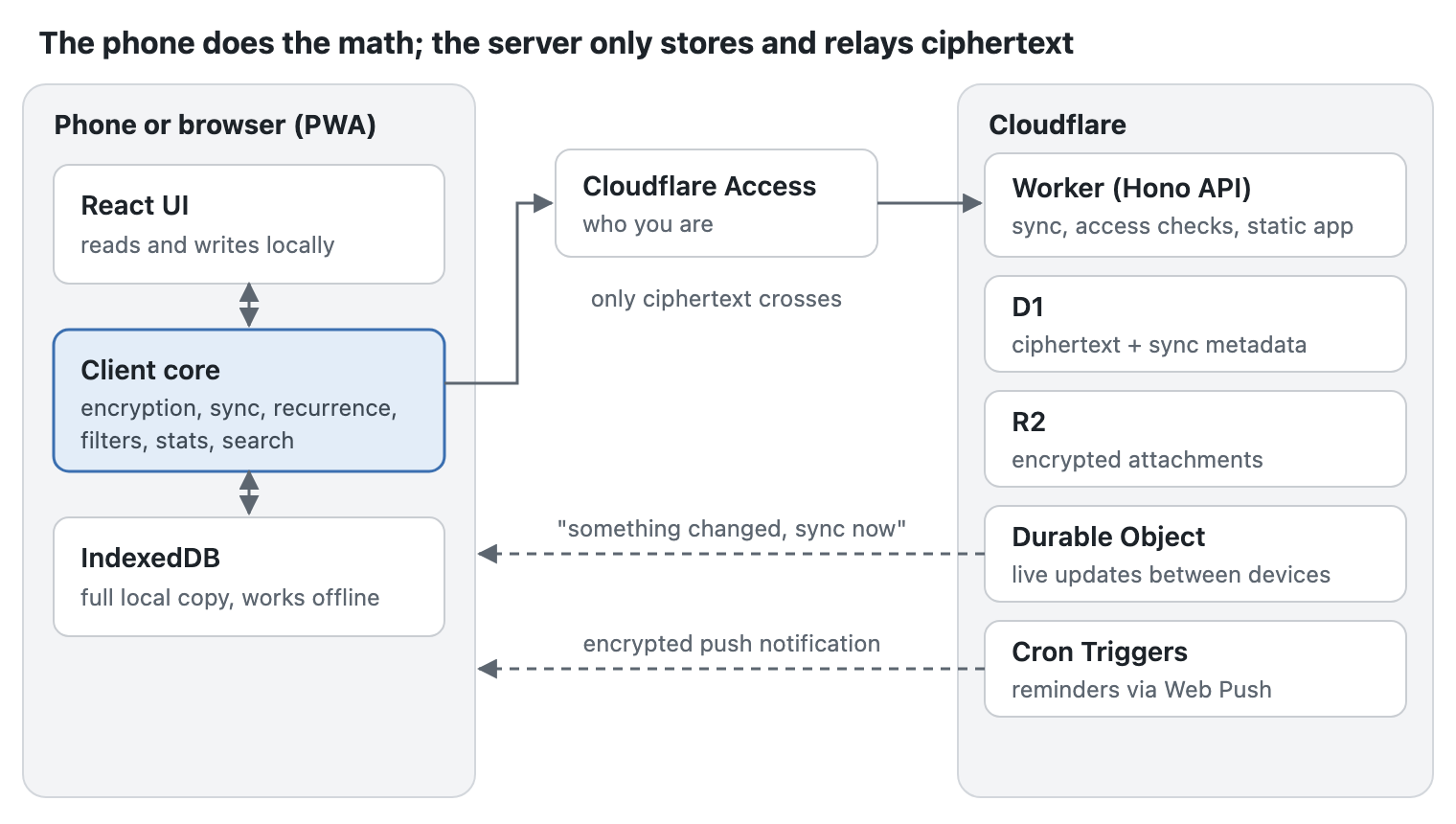
Both apps share the same architecture, and the second one reused a lot of code from the first: crypto, sync, dates, recurrence and Web Push. Everything runs on Cloudflare, and the phone does the heavy lifting.
| Layer | What I used |
|---|---|
| Frontend | React + Vite as a PWA, served as static assets by the same Worker |
| Client logic | A TypeScript package for crypto, the local database, sync, recurrence, filters, statistics and the import |
| API | Cloudflare Workers + Hono |
| Database | D1 (SQLite) for ciphertext and sync metadata |
| Files | R2 for attachments and receipt photos, encrypted before upload |
| Live sync | Durable Objects, so a change on my laptop shows up on my phone within seconds |
| Notifications | Cron Triggers + Web Push |
| Identity | Cloudflare Access in front of everything |
| Deploy | Workers Builds: a push to master builds and ships it; GitHub Actions only runs CI on pull requests |
| Tests | Vitest with the Workers pool, Playwright for end-to-end |
There’s no server to patch and no database to back up by hand. It costs $0 on the free tier. Fair price.
Local-first, because it has to be
If the server can’t read the data, it can’t search it, filter it, count it or add up a balance either. So the client does all of that. Each device keeps a full copy of my data in IndexedDB, the UI reads and writes only to that local copy, and a sync engine pushes changes whenever there’s a connection.
That turned out to be the best decision in both projects: the apps work fully offline. I can add a task or an expense in a tunnel, and it syncs when the signal comes back.
Sync is simple on purpose. The server gives every record a revision number, conflicts are settled by „last write wins” on the record’s update time, and deletions travel as tombstones so they reach every device. The expense tracker has two sync scopes, my private records and each wallet I belong to, each with its own cursor. Money is stored as integers in the smallest unit, never as floats.
Push notifications the server can’t read
Reminders were the trickiest part. A Cron Trigger runs every minute, finds notifications that are due and sends Web Push messages to all my devices. But how does the notification show the task title if the server doesn’t know it?
When I set a reminder, the client stores an encrypted payload next to it. The server forwards it as-is, and the service worker on the phone decrypts it with a key in IndexedDB and shows the real text. If the key isn’t available, the notification just says „You have a reminder.” Web Push needs request signing and payload encryption, and the popular Node library doesn’t run on Workers, so that’s built on Web Crypto too.
Building it with an AI coding agent
I built most of both apps with Claude Code, and the way I set the projects up mattered more than any prompt.
- A spec first. A
SPEC.mddescribes every view, every edge case and the acceptance criteria in my own words, including the whole key hierarchy above. For the expense tracker I also designed every screen, light and dark, before any UI code was written. - A contract the agent may not change. The database schema and the shared TypeScript types are the contract. If a task needs to change them, the agent has to stop, explain why and wait for my decision.
- Specialised sub-agents. One for the Worker, one for the client core, one for the UI and one for QA. Each works in its own git worktree and may only touch its own directories.
- Tests as the definition of done. Mandatory suites for crypto (wrong key, wrong AAD, tampered ciphertext, key rotation), sync (two devices, conflicts, tombstones, offline), user isolation, recurrence (the 31st of the month, February 29th, two devices creating the same payment) and money (sums in grosze, currencies that never mix). The to-do app alone has about 900 unit and integration tests and 52 end-to-end tests.
What I learned, and what’s next
- End-to-end encryption moves the work to the client. Once the server can’t read the data, every filter, chart and recurring rule has to run on the device. That made local-first a requirement, not a nice-to-have.
- Don’t invent crypto, copy a model that works. Bitwarden’s design is public and battle-tested. Reusing it, on top of nothing but Web Crypto, meant the hard decisions were already made.
- The second app is much cheaper. The architecture, crypto, sync and push code from the to-do app carried straight over to the expense tracker. The second app was ready after 3–4 hours.
- The boring parts matter most. Money as integers, dates without time zones, the end of the month and leap years were where the tests earned their keep.
If you want to build something similar: write the spec before the first line of code, decide early what the server is allowed to know, and let the tests be the definition of done.